dashtext
Dashtext
Quick capture for plain text, inspired by Drafts.
About
Dashtext is a place to put text first and decide what to do with it later. Press a shortcut, type, save — the draft lands in your inbox. Come back when you have time to process it.
It is an open-source, cross-platform take on Drafts, written in Rust with GPUI and GPUI Component. Linux is the first-class target; macOS and Windows should work but are not yet tested.
[!NOTE] This is an early, opinionated personal project. Version 0.4 is a ground-up rewrite; nothing from the Tauri-based 0.3 releases carries over, including their data.
Features
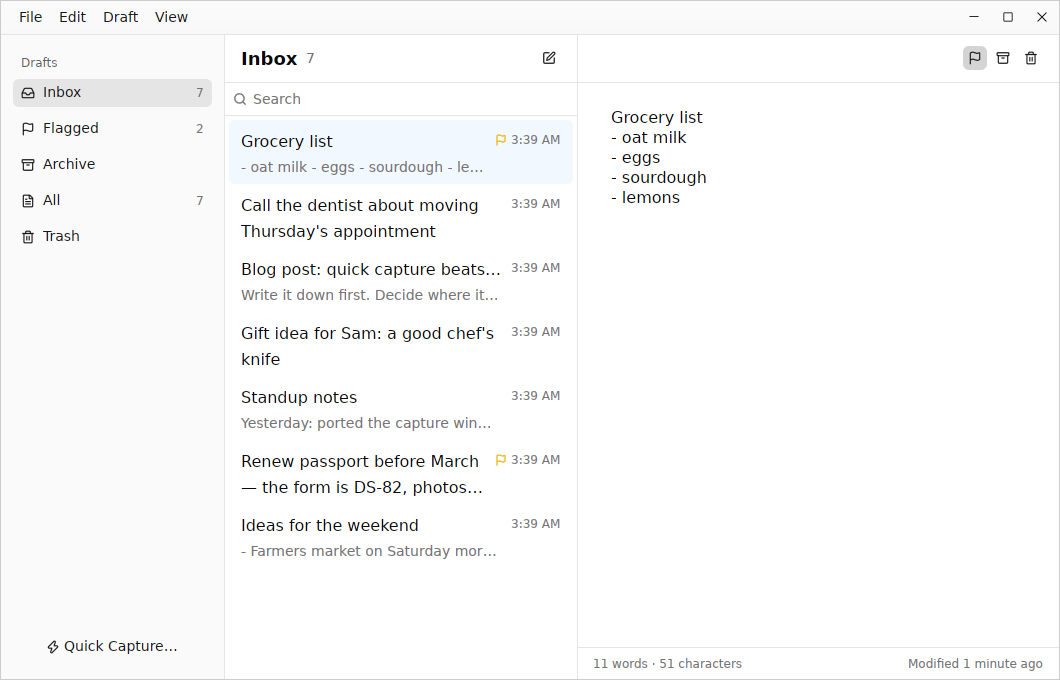
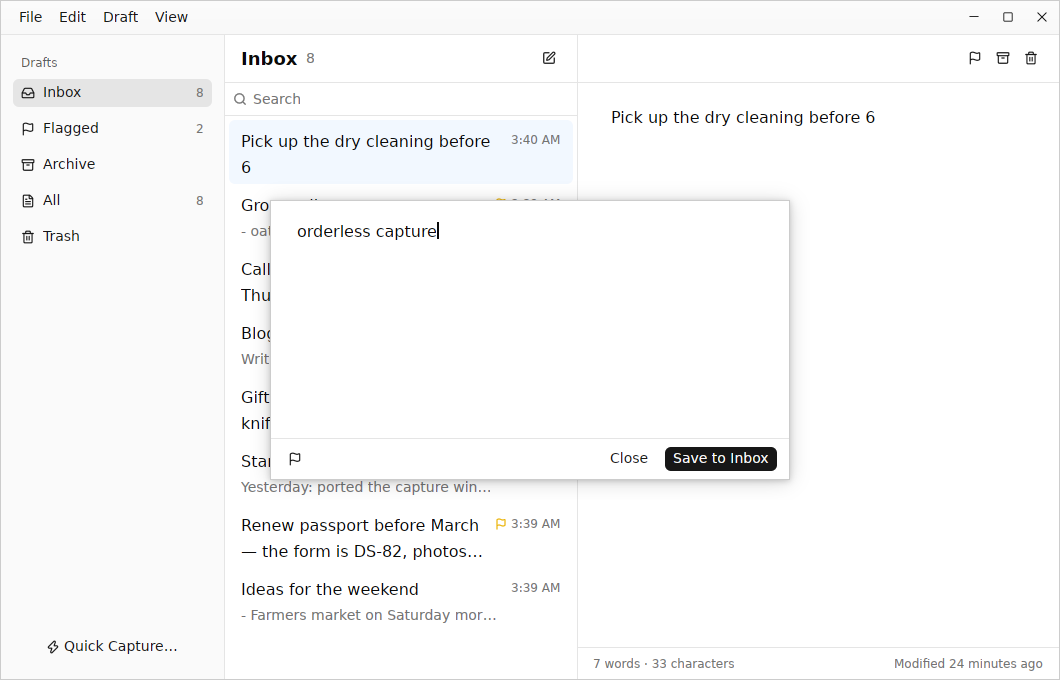
- Quick capture window — a small window for getting text down (a floating panel on macOS).
Ctrl+Entersaves to the inbox;Esccloses it and keeps the text for next time, even across restarts. - Inbox, Flagged, Archive, All and Trash — drafts live in one folder at a time; flags work across folders. The trash empties itself after 30 days.
- An editor that stays out of the way — every draft is plain Markdown text. It saves as you type, the first line becomes the title, and empty drafts are discarded instead of piling up.
- Search — words must all match,
"quoted phrases"match exactly,-wordexcludes. - Keyboard first — every command has a shortcut, and the shortcuts are listed in the menus.
- Command line —
dashtext captureopens the capture window in the running app;dashtext newadds a draft without opening anything.
Usage
dashtext                      Open the drafts window
dashtext capture              Open the quick capture window
dashtext new "Call Sam"       Add a draft to the inbox
echo "from a pipe" | dashtext new --flag
A second dashtext hands its request to the running instance, so dashtext capture opens instantly once the app is running.
Global capture shortcut
Wayland does not let applications grab global shortcuts themselves, so bind one in your desktop environment to run dashtext capture:
- GNOME: Settings → Keyboard → Keyboard Shortcuts → Custom Shortcuts
- KDE Plasma: System Settings → Shortcuts → Add New → Command
- Sway / i3:
bindsym $mod+Shift+d exec dashtext capture - Hyprland:
bind = SUPER SHIFT, D, exec, dashtext capture
Keyboard shortcuts
| Command | Shortcut |
|---|---|
| New draft | Ctrl+N |
| Quick capture | Ctrl+Shift+N |
| Search drafts | Ctrl+F |
| Back to the list from the editor | Esc |
| Flag / unflag | Ctrl+Shift+L |
| Archive / move to inbox | Ctrl+Shift+A |
| Move to trash / restore | Ctrl+Shift+Backspace |
| Delete permanently (in the trash) | Ctrl+Shift+Delete |
| Inbox, Flagged, Archive, All, Trash | Ctrl+1 … Ctrl+5 |
| Save capture | Ctrl+Enter |
On macOS, Cmd replaces Ctrl.
Where your drafts live
Drafts are stored in a SQLite database following the XDG Base Directory specification:
| What | Linux |
|---|---|
| Draft library | $XDG_DATA_HOME/dashtext/library.db (usually ~/.local/share/dashtext/) |
| Instance socket | $XDG_RUNTIME_DIR/dashtext/dashtext.sock |
macOS uses ~/Library/Application Support/app.dashtext.Dashtext/ and Windows uses %APPDATA%\dashtext\Dashtext\data\.
Installation
Binaries are not published yet. To build from source you need Rust and the native libraries GPUI uses. On Debian or Ubuntu:
sudo apt install build-essential clang cmake pkg-config \
  libfontconfig-dev libfreetype-dev libwayland-dev \
  libx11-xcb-dev libxkbcommon-dev libxkbcommon-x11-dev libvulkan1
Then:
git clone https://github.com/joshuadavidthomas/dashtext.git
cd dashtext
cargo build --release
install -Dm755 target/release/dashtext ~/.local/bin/dashtext
install -Dm644 resources/linux/app.dashtext.Dashtext.desktop \
  ~/.local/share/applications/app.dashtext.Dashtext.desktop
The desktop entry includes a Quick Capture action, so launchers and docks can open the capture window directly.
Troubleshooting
It feels slow
Dashtext draws with the GPU through Vulkan. Without a Vulkan driver (in many VMs and remote desktops, for example), it falls back to llvmpipe, which draws every frame on the CPU. Typing and scrolling then lag no matter how fast your CPU is, and Dashtext shows a No GPU acceleration notice. Set DASHTEXT_ALLOW_EMULATED_GPU=1 to hide it.
- Run
vkcube(fromvulkan-tools) to check that Vulkan works. - On machines with two GPUs, choose one with
DRI_PRIME=1, or withZED_DEVICE_ID=0x…using the device ID shown bylspci -nn | grep VGA. Dashtext uses Zed’s renderer, so Zed’s GPU troubleshooting applies too. - Debug builds are much slower than
cargo build --release.
Building runs out of memory
The release profile uses thin LTO with a single codegen unit. On small machines, build with cargo build --profile release-fast instead: it is still optimized, but it compiles in parallel without LTO.
Roadmap
Tracked with bd in .beads/. Highlights:
- Tags, and workspaces built on them (saved filters with their own sort)
- Actions: scriptable steps that send a draft somewhere (the scripting runtime is still undecided — WASM, Lua or JavaScript)
- Version history for drafts
- Markdown syntax highlighting and preview
- Global shortcut via the XDG GlobalShortcuts portal
- Import and export of Markdown files
- Sync, and eventually mobile apps
Contributing
PRs are welcome, though I may be slow to review. The code is a Cargo workspace:
crates/dashtext-core— the draft model and SQLite storage, with no UI dependenciescrates/dashtext— the desktop app (GPUI and GPUI Component)
The toolchains and tools come from devenv, so you need Nix and devenv. direnv is optional: with it, direnv allow loads the environment whenever you cd into the repository. Without it, run devenv shell.
Run just to see the development commands (just test, just clippy, just fmt), and devenv test to run everything CI checks.
Acknowledgments
Inspired by Drafts by Agile Tortoise.
License
Dashtext is licensed under the Apache License, Version 2.0. See the LICENSE file for more information.